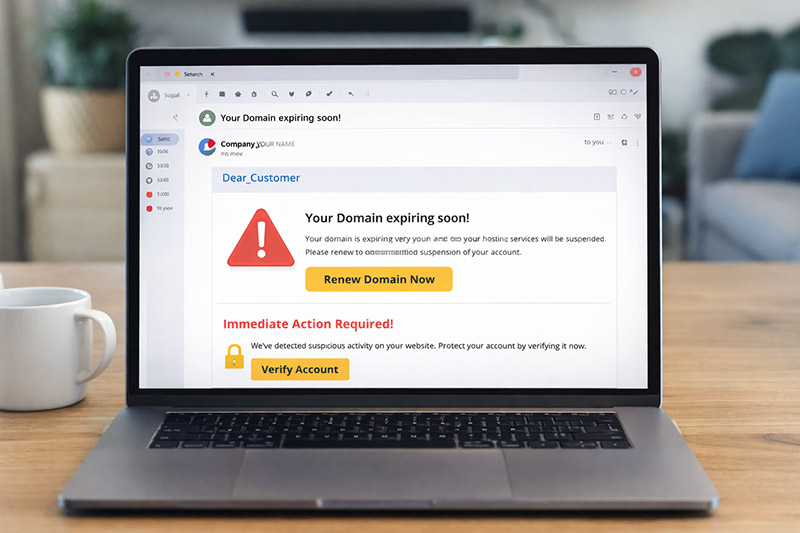
In an increasingly digital world, your personal information is a gold mine for hackers. Recently, there has been a significant surge in sophisticated phishing attacks, which are fraudulent messages designed to trick users into handing over their passwords, credit card numbers, or personal data. FBI’s Internet Crime Complaint Center (IC3), phishing remains one of the most prevalent cyber threats facing consumers today.
These scammers often impersonate trusted service providers, such as hosting companies, banks, or online retailers. They rely on “smoke and mirrors” to make their messages look identical to the real thing. Here is how you can stay one step ahead of the bait.
The Anatomy of a Modern Phishing Scam
Scammers aren’t just sending “clunky” emails anymore. They use high-quality logos, professional formatting, and convincing language. Common tactics include claiming:
- Urgent Expirations: “Your domain/subscription expires in 2 hours!”
- Unpaid Invoices: “Action required: Immediate payment needed to avoid service suspension.”
- Security Alerts: “Your account has been compromised. Click here to verify your identity.”
These messages are designed to spark panic. When we panic, we tend to click first and think later—which is exactly what the scammer wants.
5 Ways to Protect Your Digital Presence
| Red Flag | How to Verify |
| Suspicious Links | Hover before you click. On a computer, hover your mouse over any button or link. A small preview of the actual URL will appear. If it doesn’t match the official website, stay away. |
| Lookalike Domains | Check the spelling. Scammers use “lookalike” addresses like service-billing-login.com instead of the official company.com. You can use tools like Google Safe Browsing to check if a URL is known for hosting malware. |
| Urgent Threats | Take a breath. If an email uses aggressive language or threatens to delete your data immediately, it’s likely a scam. Legitimate companies usually provide multiple warnings over several days. |
| Sensitive Requests | Remember the Golden Rule. Reputable companies will never ask you to send your password, full credit card details, or social security number via email or text. |
| Unverified Dashboards | Go to the source. If you get an alert, close the email. Open a new browser tab and type the company’s website address in manually. If there is a real issue, it will be waiting for you in your official account dashboard. |
What to Do If You’re Unsure
If a message looks “off,” don’t ignore your gut feeling. Instead of clicking any links within the message, contact the company’s official support team through their verified website.
Pro Tip: Enable Two-Factor Authentication (2FA) on all your important accounts. To learn how to set this up for various services, visit TurnOn2FA.com. Even if a scammer manages to steal your password, 2FA acts as a secondary deadbolt to keep them out.
Stay vigilant, stay sceptical, and keep your data under lock and key.
